- Jun 23, 2025
Autofocus mode AF-S or ONE SHOT
- Dejan
- Camera Settings
Published in the Free Content
Focus is the process of adjusting the lens to make your subject appear sharp in the photograph. If not done well, your images will appear blurry, spoiling an otherwise great shot.
There are two main types of focus: manual focus and autofocus. Trust me; you want to use autofocus whenever possible. There may be rare moments when manual focus is necessary or preferred; we will explore them later. But let us first dive deeper into autofocus, as it will likely be the standard option throughout your photography journey.
You can activate autofocus on your camera by pressing the shutter button halfway down. The camera uses built-in sensors to adjust the lens and automatically focuses on the subject. There are two settings concerning autofocus: focus modes and AF points (autofocus points). A thorough knowledge of these settings will allow you to acquire correct focus faster and more precisely.
The choice of autofocus mode determines how the autofocus on your camera will function.
There are several modes available on most cameras, including single autofocus (AF-S), continuous autofocus (AF-C), and automatic autofocus (AF-A). The equivalents for the Canon cameras are ONE SHOT, AI SERVO, and AI FOCUS.
Each mode is designed to work optimally in specific situations, depending on whether the subject is stationary or moving. Therefore, it’s important to select the appropriate focus mode for your shooting circumstances.
THE LOGIC BEHIND THE CHOICES
How to select an appropriate focus mode
The choice of focus mode is a subject-related decision. AF-S/ONE SHOT is the mode for stationary subjects. AF-C/AI SERVO mode has been developed to capture moving subjects. AF-A/AI FOCUS is the automatic mode that allows the camera to choose between AF-S/ONE SHOT and AF-C/AI SERVO modes.
AF-S/ONE SHOT mode is suitable for stationary subjects. You can utilize this focus mode in the following way. Point the camera toward the subject and press the shutter button halfway down to activate autofocus. A sound signal is a confirmation that the subject is in focus. If you’ve turned off the sound signal, another way to confirm successful focusing is the appearance of a white or green dot somewhere in the viewfinder or the camera display (check your manual for details). As long as you keep the shutter button pressed halfway, the focus will be locked on your subject. Even if you turn the camera away from the subject while the shutter button is kept pressed, the focus will remain locked on the subject. This is a very valuable feature when capturing stationary subjects due to a frequent need to reframe. Reframing implies adjusting the frame to reinforce the composition in your photo.
Let me recap the steps for taking a photograph using this focus mode: (1) frame the subject in a casual manner and press the shutter button halfway down to attain good focus; (2) keep the shutter button pressed to lock the focus; (3) adjust the frame for better composition, and finally; (4) press the shutter button all the way to take the photo when the composition is satisfactory. As a photographer, you will be repeating this process countless times.
AF-S/ONE SHOT mode is inappropriate for (fast) moving subjects because it does not allow movement tracking. Instead, the focus will remain locked at a fixed point, failing to move with the subject.
EXERCISE: Understand how AF-S/ONE SHOT mode works
Select A/Av mode, f/5.6, and auto ISO (or an appropriate ISO value).
Select autofocus mode AF-S/ONE SHOT.
Place an object on the table not too far from the camera. Check the lens for its minimum distance to the subject to avoid getting too close. Zoom in for a shallow depth of field to observe the effect better.
Point the camera at the subject and press the shutter button halfway down to get it in focus (Figure 1).
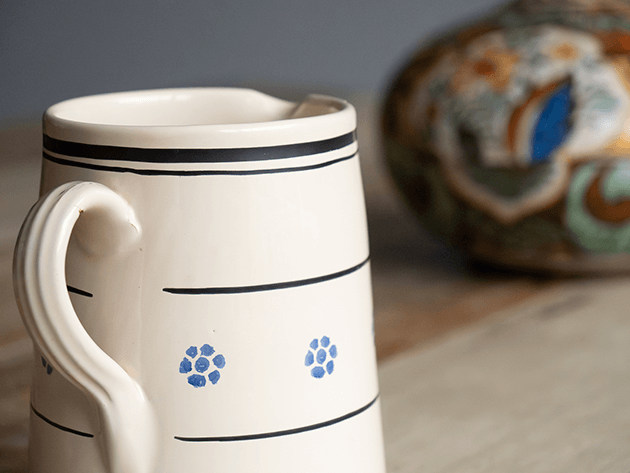
Figure 1
While keeping the shutter button pressed to lock focus on the subject, reframe the photo by turning the camera toward the background (a background with a lot of details would be convenient). The background is blurred (Figure 2).
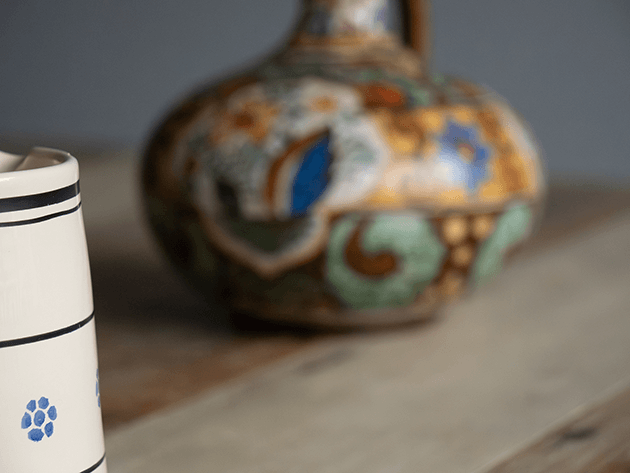
Figure 2
Reframe back to the subject. It is still in focus (Figure 3).
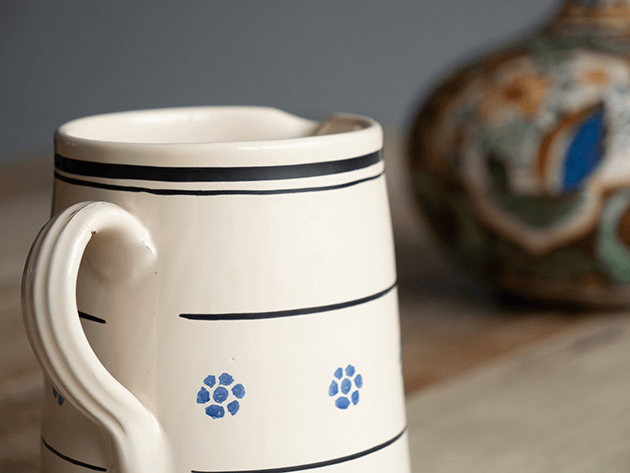
Figure 3
Conclusion: In the AF-S/ONE SHOT mode, you can lock the focus on the subject and reframe for better composition.